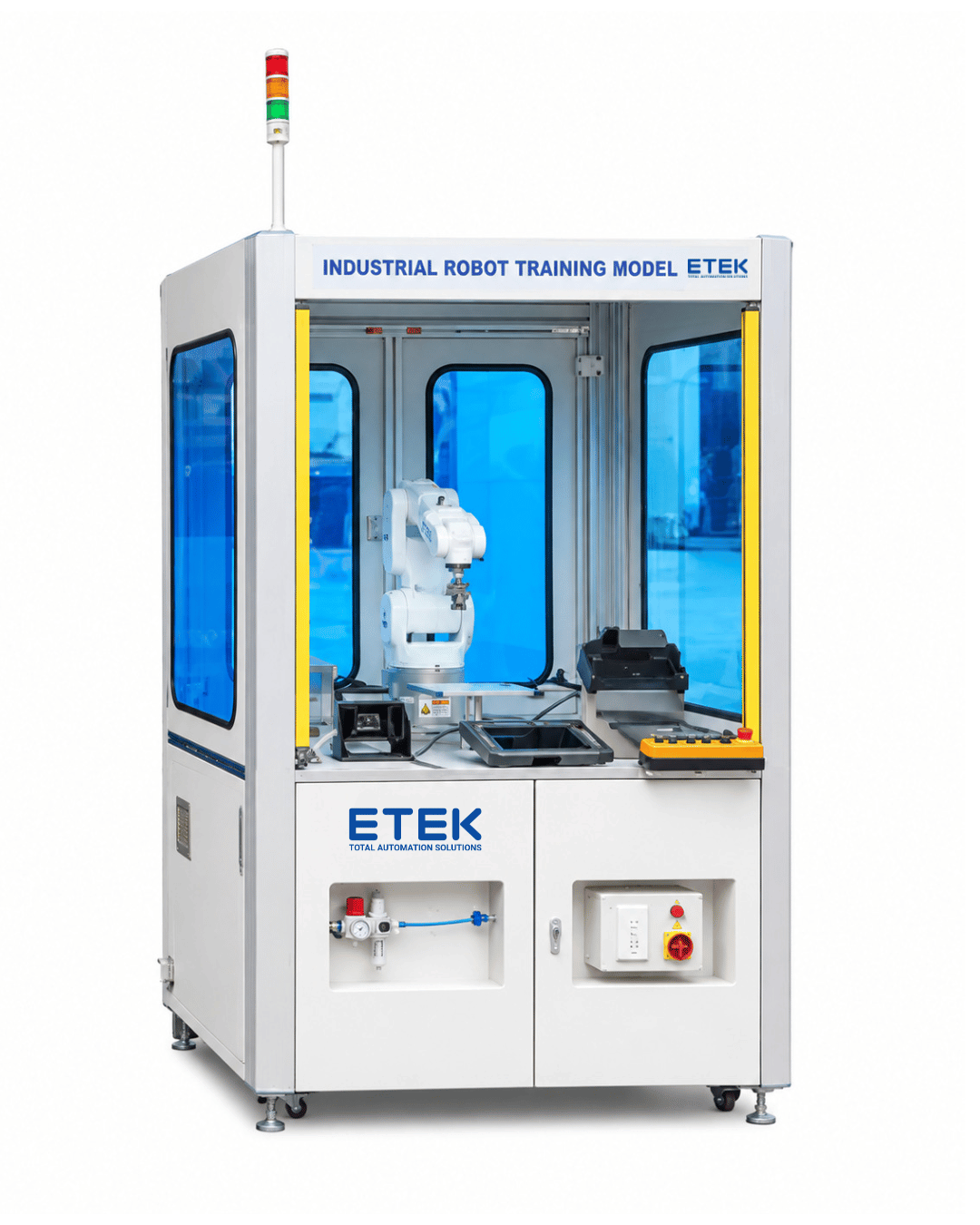
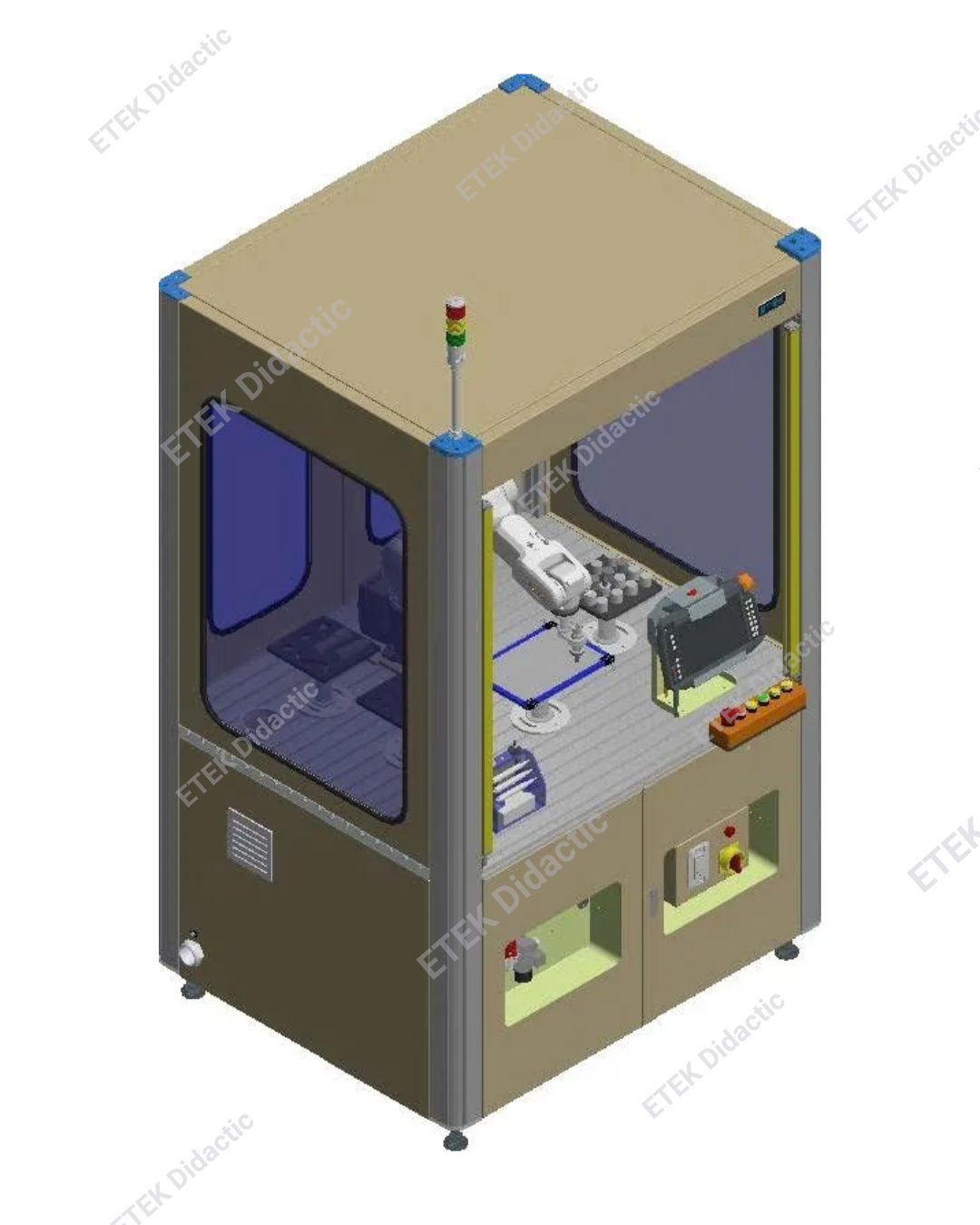
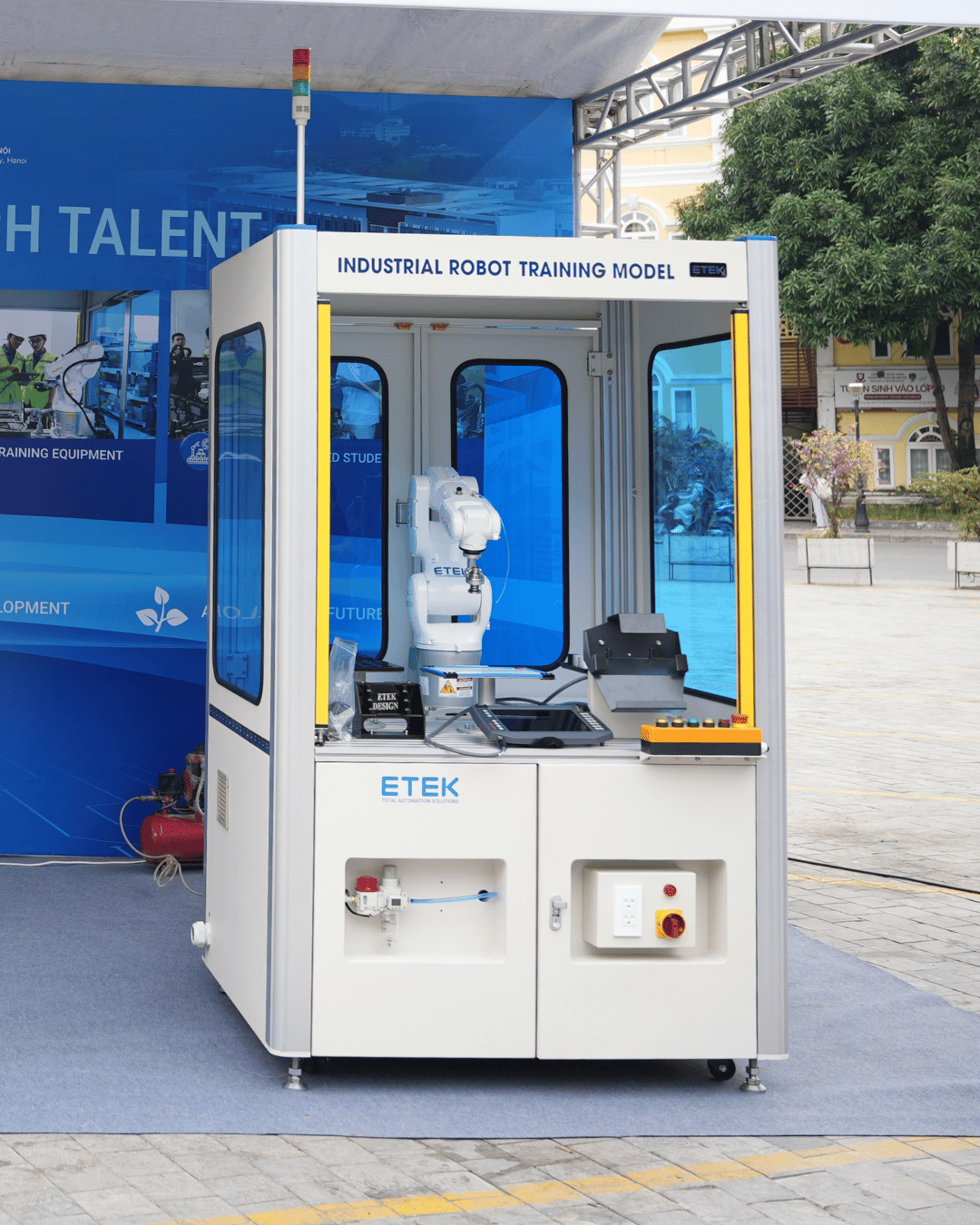
1. Robot Training Workstation
- Dimensions: 1284 × 1050 × 2115 mm (L × W × H)
- The workstation frame is fabricated from welded CT3 steel plates with electrostatic powder coating.
- The frame corners are designed with curved aluminum profiles with a radius of R = 42 mm.
- The workstation frame is divided into two levels: the robot operating area and the electrical control panel section.
Robot Operating Area:
- The robot working area is enclosed with acrylic panels. Two rear access doors are integrated to facilitate operation and ensure safety during robot operation.
- The top of the frame is made of CT3 steel to prevent dust ingress.
Electrical Control Panel Section:
- The surrounding structure is made of CT3 steel.
- Two access doors are designed at both the front and rear to facilitate installation, inspection, and maintenance.
- The worktable surface is assembled from 2 mm-thick aluminum profiles with T-slots, allowing easy mounting of components and assemblies. The surface is anodized to ensure durability and an aesthetic finish.
- The push-button control panel is ergonomically designed for easy observation and operation.
- The workstation frame is mounted on four adjustable leveling feet and four caster wheels.
- An integrated safety sensor system detects personnel entering the robot working area.
Safety Sensor Specifications:
- Operating voltage: 24 VDC ±10%
- Optical axis spacing: 20 mm
- Number of optical beams: 50
- Protective/detection field height: 980 mm
- Total sensor height: 1055 mm
- Detection range: 0–3 m
2. Industrial Robot Assembly
- Number of axes: 6
- Maximum horizontal reach: 600 mm
- Repeatability: ±0.015 mm
- Weight: 23 kg
- Maximum payload: 5.2 kg
- Installation position: Floor / Cell
- Base dimensions: 160 × 160 mm
Axis Operating Ranges:
- Axis 1: ±170°
- Axis 2: -195° to +40°
- Axis 3: -115° to +150°
- Axis 4: ±185°
- Axis 5: ±120°
- Axis 6: ±350°
- Protection rating: IP54
- Operating temperature: 0°C to 45°C
3. Robot Controller: KR C5 micro 2
- Power supply: Single-phase 200–240 V, 50–60 Hz
- Ambient operating temperature: 0–45°C
- Dimensions: 89 × 440 × 300 mm
- Maximum number of controlled axes: 8
- Protection rating: IP20
4. IoT Function Integration: iiQoT.basic (Free for the Entire Product Lifecycle)
iiQoT is a cloud-based Industrial Internet of Things (IIoT) platform centered around industrial robots.
- Asset Manager: Displays condition data, maintenance schedules, and operating status of each robot.
- Condition Monitoring: Provides real-time robot condition data, enabling early detection of wear and potential faults.
- Changelog: Records the history of software updates, maintenance activities, and robot configuration changes.
- Messages: Displays periodic notifications regarding maintenance schedules and system faults.
- Fault Diagnosis: Supports self-diagnosis by providing fault data and direct links to customer support services.
- Maintenance Manager: Displays maintenance schedules for each robot and supports predictive maintenance to increase system uptime.
- Notification Center: Provides centralized notifications regarding robot conditions, maintenance activities, and faults, enabling efficient robot fleet management.
01 Robot Simulation and Programming Software Package
a. Simulation Software: iiQWorks.Sim Advanced
Simulation:
- Fully functional virtual robot controller supporting multiple robots.
- Collision detection.
- Model extension tools for creating customized components.
- CAD data import (STEP, CATIA, JT, etc.).
- CAD data export (STEP, JT, etc.).
- 2D drawing export (DWG, DXF).
Offline Programming:
- Advanced KRL editor and compiler for offline programming, providing the same programming capabilities as a real robot controller.
- Support for component interactions (grasp/release, etc.).
- Full support for technology packages.
- Stop functions and safety scanning zones (Stop 0).
b. Robot Programming Software: iiQWorks.Sim Advanced
Full Virtual Commissioning:
- Fully functional Virtual Robot Controller (VRC).
- PLC connectivity with Siemens SIMIT or WinMOD.
- OPC UA connectivity to PLCs or other control systems.
- Scripting interface.
Application Programming:
- Additional path generator.
- CAD-to-path conversion functionality.
- Automatic collision-free path planning.
Material Flow:
- NVIDIA PhysX support.
- Component interaction simulation.
Safety:
- Full simulation of safety functions and signals.
- Ability to disable safety mode in the Virtual Robot Controller (VRC).
- Robot simulation software license package (for educational use only).
5. Quick-Change Tool Assembly: 1 Set
- The tool assembly is made of scratch-resistant anodized aluminum.
- The mechanism uses spring-loaded components to ensure operational safety.
- Dimensions: 94.5 × 50 × 100 mm.
- The quick-change vacuum tool mechanism uses suction cups with a diameter of 10 mm.
- A whiteboard marker is used for drawing and simulating glue dispensing operations.
- A calibration tip is used for robot arm alignment.
- Integrated vacuum suction cup attachment.
6. Robot Drawing and Fixture Board: 1 Set
- Dimensions: 215 × 295 × 160 mm.
- Equipped with a cylindrical base with a diameter of 45 mm.
- Drawing board dimensions: 215 × 295 mm.
- Used for robot arm drawing simulation exercises.
7. Pick-and-Place Training Assembly: 2 Sets
- Dimensions: 200 × 200 × 164 mm.
- Uses cylindrical workpieces measuring 30 × 30 mm.
- Number of positions: 16.
- Number of assemblies: 2.
- Equipped with cylindrical bases with a diameter of 45 mm.
- The robot transfers workpieces from Assembly 1 to Assembly 2.
8. Contour-Following Drawing Training Assembly: 1 Set
- Dimensions: 200 × 200 × 164 mm.
- The base is made of precision-machined solid aluminum, with an adjustable diameter of 45 mm.
- The working surface is made of POM plastic.
9. Electrical Equipment Panel
Circuit Breaker:
- Single-phase, two-pole circuit breaker.
- Rated current: 16 A.
Contactor:
DC Power Supply:
- Input: 200–240 VAC / 50 Hz.
- Output: 24 VDC, 4 A.
- Power: 100 W.
PLC Training Module – S7-1200:
- CPU type: 1214C.
- Power supply: 20.4–28.8 VDC.
- Digital inputs: 14.
- Digital outputs: 10.
- Analog inputs: 2.
- PROFINET port: 1.
10. Pneumatic Training Panel: 1 Set
- 01 Filter regulator unit.
- 01 Vacuum generator valve.
- 01 Solenoid valve.
- 04 Pneumatic quick-connect fittings.
11. Tower Light Assembly
- Operating voltage: 24 VDC.
- Indicator colors: Red, Yellow, Green.
12. Air Compressor: 1 Set
- Specialized laboratory air compressor featuring an ultra-low noise operating design.
- Operating voltage: 220 VAC, 50 Hz.
- Power: 550 W.
- Noise level: 65 dB.
- Tank capacity: 30 L.
13. AR-Based Software for Practical Operation Guidance Using Augmented Reality Technology
a. General Features
- The AR-based practical training guidance system is designed to support learners in performing technical exercises according to standardized procedures through AR smart glasses and dedicated training software.
- The solution enables learners to access technical procedures in an intuitive, proactive, and consistent manner while reducing their dependence on continuous direct instructor guidance.
- Operational instructions are displayed visually within the learner’s field of view. Learners follow the guided procedures to standardize operations, develop practical skills, and shorten training time.
- When wearing the AR glasses, learners receive step-by-step visual guidance, including:
- Equipment recognition.
- Identification of correct installation and connection positions.
- Step-by-step instructions for performing practical exercises.
- Access to visual instructions through images, videos, and PDF files.
- Recording and storage of execution history upon completion of each step.
Key Features:
- Step-by-step practical training guidance.
- Visual indication of installation positions.
- Electrical circuit installation and wiring instructions.
- Equipment recognition.
- Practical training safety instructions.
- Required technical standards and specifications (Text / PDF / Video).
- Safety precautions and warnings (Text / PDF / Video).
b. Hardware Technical Specifications
- Resolution: 1920 × 1080 per eye.
- Audio: Two directional speakers integrated into the two temples of the glasses and two built-in microphones.
- Field of View (FOV): 52°.
c. Display Functions
- Displays the real-world practical training environment with AR overlays.
- Displays equipment models in Augmented Reality (AR).
14. Digitalization, Simulation, and Practical Training Support Software
a. General Introduction
- Digitalization, simulation, and teaching-practice support software developed to closely connect theoretical lessons, practical training content, and the manufacturer’s training hardware systems.
- The software provides comprehensive support for instructors and learners throughout the teaching, learning, assessment, and practical training processes, following a modern training model.
b. General Features
- Vietnamese-language interface with a user-friendly and easy-to-use design.
- Web-based operation, accessible anytime and anywhere through a web browser.
- Centralized management of training data, teaching materials, equipment, and user accounts.
- Integrated AI technology to support the development of training content and assessment tests.
- Synchronization between software content and the manufacturer’s training hardware equipment.
- Suitable for vocational education institutions, colleges, universities, and technical training centers.
- Registered copyright certificate issued by the Copyright Office of Vietnam.
- Role-based access control according to user categories.
- Individual username and password for each user.
- Data deployment options:
- Hosting on the provider’s Cloud Server; or
- Installation and operation on the educational institution’s internal server, upon request.
- Course content, learning materials, lectures, and practical exercises are continuously updated by users and the software provider.
- Supports instructors and learners in effectively accessing theoretical materials, practical training resources, and simulation exercises associated with the supplied training hardware.
- Enables learners to independently research, study, and practice through the software throughout the training process.
- Allows instructors to create their own courses, lecture content, assessment tests, and examinations.
- Supports multiple-choice examinations and online tests according to the training schedules established by the instructors.
c. Teaching and Learning Interface
- User groups: Instructors and learners.
- Displays a list of subjects based on the training discipline associated with each user’s account.
- Provides access to detailed lessons for each subject.
- Each lesson includes a multiple-choice test to assess learners’ knowledge.
- Each lesson includes corresponding practical exercises.
- Stores the history of lessons taught and completed.
- Allows users to evaluate the quality of teaching materials.
- Supports practical exercises compatible with the supplied hardware training equipment.